This post explains how a Python script connects and interacts with the Roco Z21 DCC Control Center. In a previous post I introduced the Z21 where I explained that a computer can connect to the Z21 via the network. This was a bit of theory. Now we’ll go hands-on!
The mission
We’re going to write a Python script that will query and display the serial number of a Z21.
The setup
The setup I use consists of:
- z21 (white), directly connected to my home network, using the default IP address: 192.168.0.111,
- Apple MacBook Pro M1, running Mac OS 26.1 (Tahoe), connected to my home network,
- Python 3.14.1, using IDLE as the development environment,
- Apple iPhone 14, running iOS 26.1, connected to my home network and Roco’s Z21 app.
No layout or rolling stock are needed for this experiment.
Let’s cook!
This is the code necessary to retrieve the serial number of a Z21:
import socket

s = socket.socket(socket.AF_INET, socket.SOCK_DGRAM)
s.sendto(b"\x04\x00\x10\x00", ("192.168.0.111", 21105))
incoming_packet, sender = s.recvfrom(1024)
print("Incoming packet: ", incoming_packet)
print("Serial number: ", \
    int.from_bytes(incoming_packet[4:], \
    byteorder = "little"))
And this is the result that I get:
Incoming packet:  b'\x08\x00\x10\x00\xa3\xcf\x01\x00'
Serial number:  118691
The serial number is shown in the Z21 app as follows:
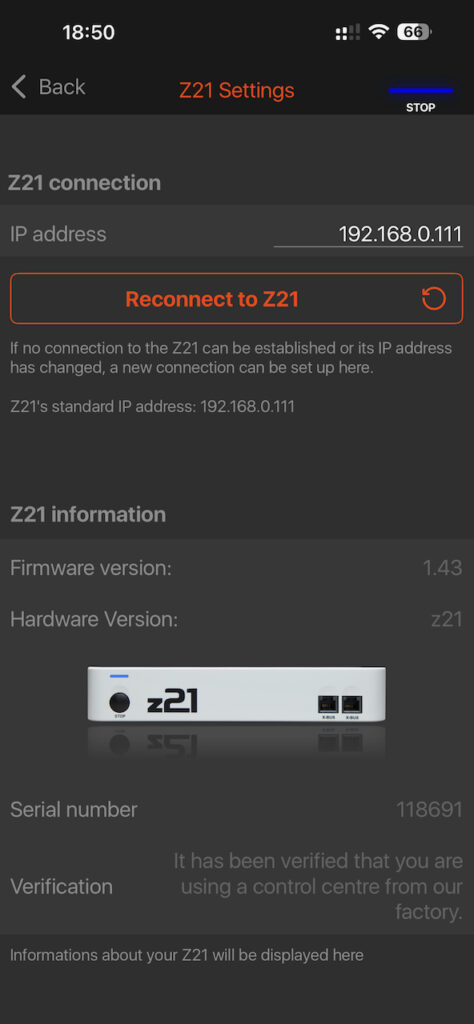
The serial number matches the output that I received from the Python script. Happy Days!
In depth
Let’s look at the Python script line by line, to see how it works:
import socketFirst step, we’ll need to load the standard socket module to get access to networking facilities.
s = socket.socket(socket.AF_INET, socket.SOCK_DGRAM)Then, we create a socket. Since the Z21 uses the UDP/IP protocol, the address family is IP (AF_INET) and the protocol type is datagram (SOCK_DGRAM). We refer to the newly created socket as s.
s.sendto(b"\x04\x00\x10\x00", ("192.168.0.111", 21105))The socket contains a sendto function that takes a message and the destination as parameters. The IP address of the Z21 is 192.168.0.111 (default and confirmed by the screenshot above) and the port the Z21 listens to, is 21105 as per specification.
The message is the request for getting the serial number. The structure for requests to, and responses from the Z21 is:
- DataLen. The length of the message, in two bytes, little endian
- Header. The type of request, in two bytes, little endian
- Data. Extra bytes, depending on the type of request.
For the request of the serial number, the header is 0x0010 (hexadecimal notation). There is no additional data for this request, so the length of the message shall be 0x0004 bytes. In little endian format, the request shall be 0x04, 0x00, 0x10, 0x00.
incoming_packet, sender = s.recvfrom(1024)Now, we are going to wait for the response. When receiving data from the socket, we will get the sender information (IP address and port number), as well as a message. We’ll ignore the sender information for now.
print("Incoming packet: ", incoming_packet)Let’s look at the message that we received: 0x08, 0x00, 0x10, 0x00, 0xa3, 0xcf, 0x01, 0x00. The first two bytes specify the length of the message (again, hexadecimal, little endian): 0x008, which is 8 bytes. The header is the same as the request: 0x0010. Contrary to the request, there is actually data in this message, 4 bytes.
print("Serial number: ", \
    int.from_bytes(incoming_packet[4:], \
    byteorder = "little"))
As a last step, we take this data, everything after the 4th byte, and convert it to an integer (again, the format is little endian). This turns the content of the data that was shown in hexadecimal format to a decimal format that we can relate to. And this is how we get to 118691 which is the actual serial number of my Z21.
Limitations
This code was quick and dirty, just to see if it works. Quick is nice, but dirty isn’t. This is where we cut corners:
- Multiple senders. it is possible that something else than the Z21 sends a message to the socket. In that case, that message needs to be handled separately, or just ignored. Then we’ll have to start listening again for the message that we expected. So we’ll have to verify when we receive a message, that the sender was actually the Z21.
- Asynchronous communication. The protocol is asynchronous, which means that the Z21 may send messages about status changes at any time, in any order. For example, a locomotive that was controlled by another throttle, changed speed, a turnout was changed, a locomotive entered a monitored section of the layout, or a short circuit on the track forced the layout to be switched off entirely. This means that we have to interpret every incoming message, decide how to handle such events and continue listening for the message we expected. This requires some sort of event driven approach.
- Multiple responses in a single message. Now we received only a single response in the message. However, if the Z21 needs to send multiple responses, it can choose to combine these responses into a single message. We’ll need to write a function that takes a message and isolates the single or multiple responses before they can be processed.
Conclusion
We have demonstrated that we can establish meaningful communication with the Z21. We have studied how to connect, how to send requests and how to receive responses. And we have looked at the basic structure of these requests and responses.
Now we can learn how to send more types of requests and interpret more types of responses. We can think of other properties as shown in the screenshot above, but also command locomotives, turnouts and check feedback from occupancy detection.
While all this seems fairly straightforward, the complexity will increase significantly once we add logic for dissecting multiple responses in a single message and especially when we have to deal with the asynchronous nature of communication.
Leave a Reply